Nghe hơi “đi vào lòng đất”, nhưng đúng là hiện tại NanoBanana của Google đang nổi lên như top 1 công cụ chỉnh ảnh bằng AI, vừa miễn phí, vừa mạnh mẽ. Nó hoạt động ngay trong Gemini / Google AI Studio, chỉ cần:
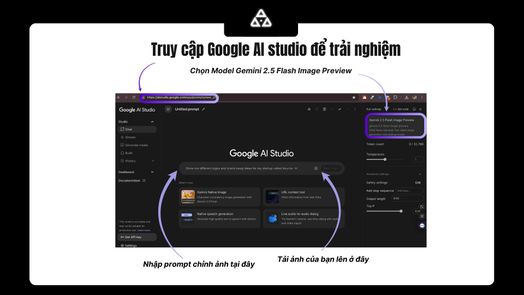
- Truy cập Gemini hoặc Google AI Studio.
- Chọn model Gemini 2.5 Flash Image Preview.
- Nhấn nút + để upload ảnh.
- Nhập prompt chỉnh ảnh → chọn Run.
Vậy thử ngay 10 use case hay nhất dưới đây, đảm bảo bạn sẽ bất ngờ với sức mạnh của NanoBanana:
1. Chế ảnh meme hài hước
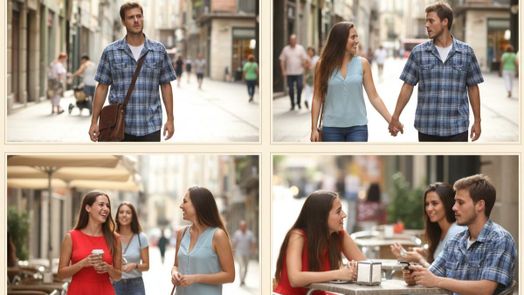
- Upload ảnh meme gốc (vd: Distracted Boyfriend).
- Viết prompt để biến tấu → thành 4 ảnh mới tự nhiên hơn.
Prompt mẫu (EN):
Transform this classic meme photo "Distracted Boyfriend" into a natural photo set of the same couple.
Keep the same people and outfits, but remove the 'distracted' expression.
Make them look happy, holding hands, walking together in the street, and also sitting at a cafe, smiling and chatting.
Generate a realistic 4-panel sequence like candid shots.
2. Tạo dáng nhân vật theo ảnh tham chiếu
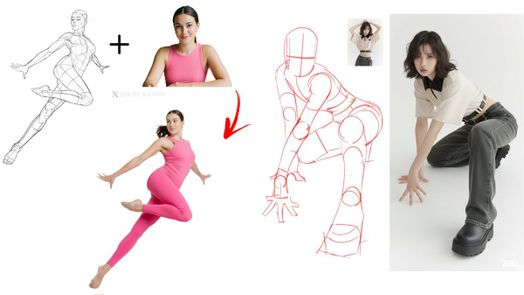
- Chuẩn bị ảnh gốc + ảnh pose mong muốn.
- Upload cả hai.
Prompt:
Cho cô gái (ảnh 2) tạo dáng như ảnh 1.
3. Dựng meme hoạt hình thành hậu trường như thật
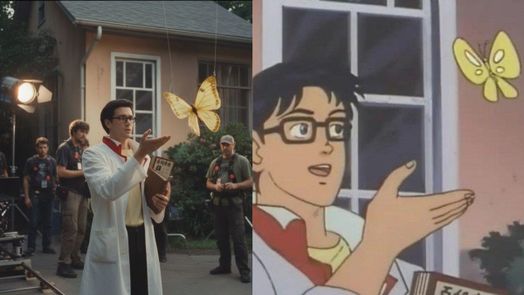
Upload ảnh nhân vật hoạt hình → biến thành ảnh behind-the-scenes.
Prompt:
Biến bức ảnh này thành ảnh hậu trường phim điện ảnh, background có đoàn làm phim, phong cách thực tế.
4. Tối ưu thumbnail YouTube / Facebook
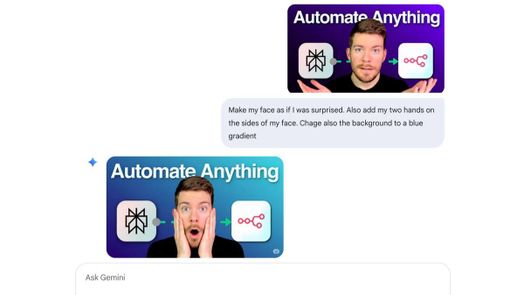
Tạo ảnh bìa bắt mắt, chuyên nghiệp mà không cần Photoshop.
5. Tùy biến màu sắc anime
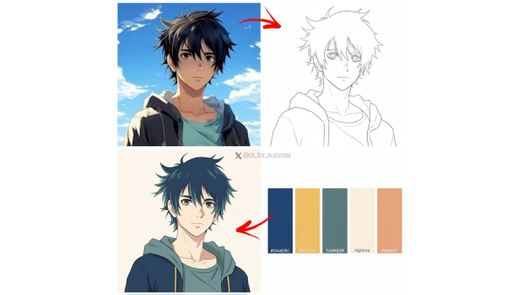
Biến đổi nhân vật anime với bảng màu riêng.
Prompt:
Draw a line art / outline version of this character.
Use this color palette accurately to color the line art, do not use any other colors.
6. Dựng nhân vật 2D thành ảnh hậu trường phim
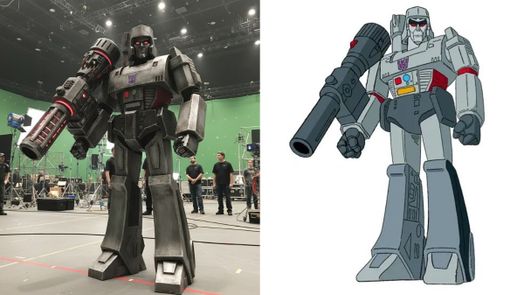
Biến nhân vật hoạt hình thành CGI thực tế trên phim trường.
Prompt:
Transform this 2D cartoon character into a realistic "behind the scenes" movie set photo.
Keep the same character design, proportions, and details, but render it as if it is a physical costume or CGI model standing on a film set.
Include studio lighting, green screen background, cameras, crew members, and film equipment around.
Make it look like a candid photo taken during movie production.
7. Ghép 8 ảnh thành 1 collage sáng tạo
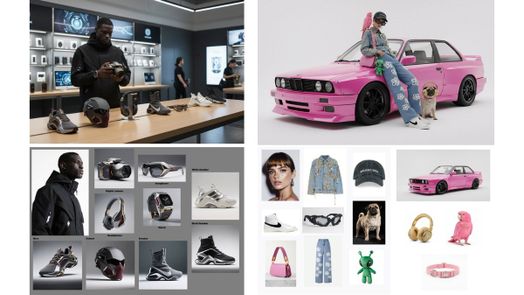
Ghép moodboard, fashion grid, hay editorial collage.
Prompt:
Create a single creative collage image by combining 8 different smaller images.
Arrange them into a visually appealing grid or layout, making sure each image is clearly visible but harmonized into one composition.
Keep realistic lighting and consistent colors so the collage looks polished.
👉 Tùy chọn:
- Grid 3x3:
Arrange them in a 3x3 grid layout... - Moodboard thời trang:
Style it like a fashion moodboard... - Collage nghệ thuật:
Arrange images in an artistic, overlapping collage style...
8. AI + AR: Ảnh tĩnh → tour guide ảo
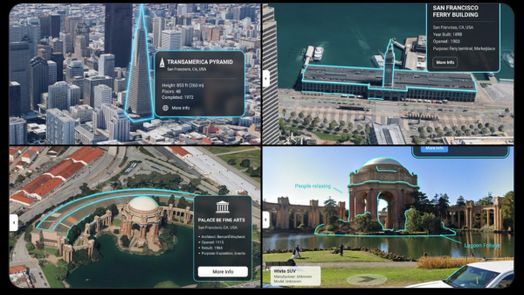
Upload ảnh bản đồ hoặc địa điểm → AI tự highlight POI và chú thích.
Prompt:
You are a location-based AR experience generator.
Highlight [point of interest] in this image and annotate relevant information about it.
9. Phục chế ảnh cũ, thêm màu
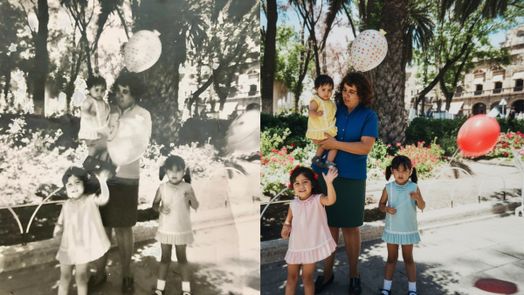
Khác nhiều tool khác, NanoBanana giữ được đường nét gốc 70–80%.
Prompt:
Phục chế ảnh này, thêm màu sắc phù hợp.
10. Image Fusion – Hợp nhất hình ảnh
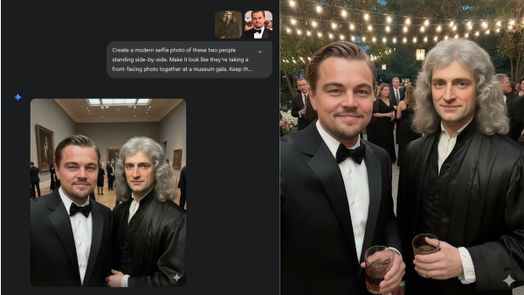
Ghép nhiều người từ ảnh khác nhau vào 1 ảnh selfie mới.
Prompt:
Tạo một bức ảnh selfie hiện đại của hai người này đứng cạnh nhau.
Làm cho nó trông giống như họ đang chụp ảnh trực diện cùng nhau tại một buổi gala trong viện bảo tàng.
Include elegant outfits, evening lighting, champagne glasses in hand.
Kết
NanoBanana hiện đúng kiểu “công cụ dân chơi hệ ảnh”: miễn phí, dễ xài, đầu ra đỉnh cao. Từ chế meme, làm thumbnail, phục chế ảnh, đến biến anime thành hậu trường phim đều gọn nhẹ chỉ bằng prompt.